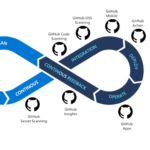
In 2025's fast-paced development environments, security breaches cost enterprises an average of $4.5 million per incident. Veracode's 2025 State of Software Security Report reveals that organizations implementing DevSecOps practices reduce vulnerabilities by 68% compared to traditional approaches.
Real-World Success: Siemens Healthineers
By integrating Veracode into their CI/CD pipelines, Siemens reduced critical vulnerabilities by 82% and achieved 95% automated security testing coverage across 500+ repositories.
View Case Study →Core DevSecOps Components in 2025
- Shift-Left Security: SAST scans in IDEs during coding
- Automated Governance: Policy-as-code enforcement
- Intelligent Remediation: AI-powered fix suggestions
Veracode's Feature Breakdown
| Feature | Impact | Integration Time |
|---|---|---|
| SAST/DAST Scanning | 75% faster vulnerability detection | <1 hour |
| SCA Analysis | 90% open-source risk reduction | 30 minutes |
| API Security | 67% fewer API breaches | 45 minutes |
Jenkins CI Integration Guide
// Jenkinsfile Example
pipeline {
  agent any
  stages {
    stage('Veracode Scan') {
      steps {
        veracode(
          applicationName: 'prod-app-v2',
          criticality: 'Critical',
          sandboxName: "jenkins-build-${BUILD_NUMBER}",
          vid: credentials('veracode-id'),
          vkey: credentials('veracode-key'),
          scanTimeout: 90,
          failBuild: true
        )
      }
    }
  }
}
Best Practices:
- Use Jenkins Credentials Binding for secure key management.
- Set
scanTimeoutto 120+ minutes for large codebases.
GitHub Actions Implementation
name: Veracode Security Scan
on: [push, pull_request]

jobs:
  veracode-sast:
    runs-on: ubuntu-latest
    steps:
    - name: Checkout code
      uses: actions/checkout@v4

    - name: Veracode SAST Scan
      uses: veracode/uploadandscan-action@v2
      with:
        app_id: ${{ secrets.VERACODE_APP_ID }}
        api_key: ${{ secrets.VERACODE_API_KEY }}
        criticality: High
        scan_timeout: 75
        fail_build: true
Pro Tips:
- Use branch protection rules with scan status checks.
- Integrate SARIF reports for GitHub code scanning alerts.
Security-as-Code Implementation
# veracode-policy.yml
policy:
  name: Production Security Standard
  rules:
    - severity: Critical
      max_count: 0
    - severity: High
      max_count: 3
  checks:
    - SAST
    - DAST
    - SCA
  enforcement:
    branches:
      - main
      - release/*
How to Read and Analyze Veracode Scan Results
1. Accessing Results in Veracode Platform
After a scan completes, navigate to the Results tab to explore:
- Security Dashboard: Real-time vulnerability trends and overall security posture.
- Policy Evaluation: Compliance status against your organization’s security policies and regulatory standards.
- Detailed Findings: Vulnerabilities categorized by CWE (Common Weakness Enumeration), severity, and affected components.
2. Key Metrics to Evaluate
| Metric | Description | Impact |
|---|---|---|
| Security Quality Score | A score from 0–100 indicating overall application risk (70+ is considered acceptable). | Quick indicator of app health. |
| Flaw Density | Number of flaws per MB of code scanned. | Measures code quality and security hygiene. |
| Remediation Rate | Percentage of identified flaws that have been fixed. | Indicates development and security team effectiveness. |
3. Prioritizing Vulnerabilities
Veracode uses a three-dimensional approach to help prioritize fixes:
a. Severity Levels
| Veracode Level | CVSS Score Range | Recommended Action |
|---|---|---|
| Very High (5) | 8.1 – 10.0 | Immediate fix required |
| High (4) | 6.1 – 8.0 | Fix within 72 hours |
| Medium (3) | 4.1 – 6.0 | Schedule fixes in next sprint |
b. Exploitability Matrix
| Likelihood | Priority | Example |
|---|---|---|
| Very Likely | Critical | SQL Injection in authentication module |
| Unlikely | Low | Theoretical Cross-Site Scripting (XSS) |
c. Effort to Fix
- Simple: Configuration changes or parameter sanitization (under 1 hour)
- Complex: Code refactoring or architectural changes (8+ hours)
4. Using Fix First Guidance
Veracode’s AI-powered prioritization suggests addressing flaws in this order:
- Critical severity + Very Likely exploitability
- High severity + Likely exploitability
- Medium severity + Simple fixes
5. Interpreting Reports
Key Report Types:
- Executive Summary: Top 5 CWEs (e.g., CWE-89: SQL Injection), vulnerability trends, and component risk.
- Customizable Detailed Report: XML or JSON format listing each finding with file location, severity, and exploitability.
- Compliance Reports: Maps vulnerabilities to standards like PCI-DSS and GDPR with remediation deadlines.
  89
  5
  Very Likely
  src/login.java:42
6. Advanced Analysis Techniques
- Cross-Scan Comparison: Track vulnerability trends across application versions to measure progress.
- Component Analysis: Identify vulnerable third-party libraries and prioritize upgrades.
- False Positive Management: Mark findings as mitigated with evidence to reduce noise.
# Example CLI to list vulnerable components
veracode component --list --vulnerable
7. Real-World Analysis Workflow
Capital One's Approach:
- Daily review of automated scan results.
- Auto-ticket creation for Critical and High severity issues.
- Weekly security score and remediation rate reviews.
- Monthly security trend analysis meetings with Dev and SecOps teams.
8. Best Practices for Results Management
- Set automated alerts for new critical vulnerabilities and policy violations.
- Leverage Veracode Fix for AI-generated remediation suggestions.
- Integrate Veracode findings with issue trackers like JIRA or ServiceNow for streamlined workflows.
# Example: Before and after Veracode Fix for SQL Injection
# Before (vulnerable)
query = "SELECT * FROM users WHERE id=" + user_input

# After (parameterized query)
query = "SELECT * FROM users WHERE id=%s"
cursor.execute(query, (user_input,))
Ready to Transform Your Security Posture?
Our DevSecOps experts can help you implement Veracode in under 48 hours.
Schedule Free Consultation →Future Trends in DevSecOps
- AI-generated remediation patches (available in Veracode v8.3+)
- Real-time container scanning in Kubernetes orchestrators
- Automated compliance reporting for GDPR/CCPA
Recommended Resources
Contact Us: If you want expert assistance in implementing VeraCode contact us here. Let’s accelerate your business growth with best DevSecOps tools together!